
Best Scheduling App for Contractors Revealed
For contractors juggling complex projects, the best scheduling app isn't just about a shared calendar. It's a central hub that ties communication together, automates who does what, and gives you a live look at how the project is unfolding. The whole point is to move past the costly delays and mix-ups that come with relying on spreadsheets and endless phone calls, giving you a serious competitive edge.
Why a Scheduling App Is Non-Negotiable for Modern Contractors
In the high-stakes, fast-paced construction market of the UAE, sticking to old-school methods is a recipe for disaster. The pressure is immense, whether you're managing a multi-million dirham mega-project with a tight deadline or trying to coordinate a diverse, multilingual workforce. Traditional scheduling creates bottlenecks where one small miscommunication can snowball into project-wide delays and blown budgets.
This is exactly where a dedicated scheduling app becomes a game-changer. It’s not just a digital to-do list; it’s the central nervous system for your entire operation, built to handle the constantly shifting reality of a construction site.
From Chaos to Control
Picture this: a critical materials delivery is late. With a manual system, that news might take hours to trickle down to the right people, leaving crews standing around with nothing to do. A scheduling app, on the other hand, pings the project manager, subcontractors, and even the client instantly, so everyone can adapt on the fly. You can re-prioritise tasks and move resources around in minutes, not days. That kind of agility is simply impossible with a spreadsheet. Realising the broader key advantages of business process automation makes it clear why this shift is so vital for staying profitable.
A scheduling app turns reactive fire-fighting into proactive project management. It creates a single source of truth, making sure everyone—from the site foreman to the finance department—is working off the same, up-to-the-minute information.
Meeting Modern Project Demands
The push for digital tools in the region's construction sector is picking up speed. The Middle East has been quick to adopt technologies that help manage complex projects more efficiently. One recent industry report noted that with 97.6% of construction leaders in the region expecting revenue growth, investing in digital tools is a top priority to keep up. This move toward apps offering real-time collaboration and cloud access is crucial for making projects more transparent and delivering them on time and on budget. You can find more data on this trend by reviewing the Construction Industry Outlook 2025.
Ultimately, getting the right scheduling software in place lets contractors:
- Optimise Resource Allocation: Make sure the right people and equipment are where they need to be, when they need to be there.
- Streamline Communication: Cut down on errors by keeping all project updates and documents in one central place.
- Enhance Project Visibility: Get a real-time view of progress, which allows for quicker, smarter decisions.
- Improve Profitability: Minimise expensive rework and downtime, which has a direct, positive impact on your bottom line.
What to Look for in a Contractor Scheduling App
Picking the right scheduling app goes way beyond a quick skim of a features page. If you want to make a smart investment, you need a clear framework that connects each button and function to a real-world problem on the jobsite. A truly effective app isn’t just a digital calendar; it’s the central nervous system for your entire operation.
Let's break down the must-have features into four critical areas of your business. This isn't just a checklist—it’s about evaluating software based on how well it solves your specific headaches and keeps your projects profitable.
H3: Core Scheduling and Planning
This is the absolute foundation of any decent scheduling tool. These are the features that give you that high-level, birds-eye view of a project, making sure all the moving parts stay in sync. Without a solid core, even the slickest-looking app will let you down when things get complicated.
You need more than just basic date entries. Gantt charts are non-negotiable for visualising the entire project timeline. They clearly show how one task flows into the next, helping you spot potential bottlenecks before they bring your site to a standstill.
Just as important are task dependencies. This is what lets you link jobs together so that if the concrete pour gets delayed by a day, the framing schedule automatically adjusts. It’s a simple concept, but it’s what stops a crew from showing up to a site that isn’t ready, saving you a fortune in wasted time and wages. And for jobs with heavy equipment, tying this into a solid preventive maintenance schedule template is a game-changer, ensuring your machinery is actually available and working when you need it.
H3: Crew and Resource Management
Your team is your biggest asset, and the right app will help you manage them like one. Crew management features are all about getting the right people to the right place at the right time, with the right equipment to do the job.
Here are the essentials:
- Real-Time Time Tracking: Look for a mobile-friendly system with GPS stamping. This gives you iron-clad records for payroll and job costing, cutting out the guesswork and endless paperwork for your teams in the field.
- Skills Matching and Allocation: The best apps let you tag crew members by their skills—think certified electrician, licensed plumber, or certified welder. This makes it incredibly easy to find and assign the most qualified person for a specific task in seconds.
- Dispatching and Route Optimisation: For any contractor doing service calls, this is a must. It plans the most efficient daily routes for your teams, cutting down on fuel costs and travel time, which means you can fit more jobs into a day.
Imagine a client makes a last-minute change request. With a good crew management tool, a project manager can instantly see who is free, check their qualifications, and reassign them to the new task—all from their phone on site.
H3: Project Operations and Documentation
A modern construction project produces a mountain of paperwork and data. The best scheduling app acts as a single, organised hub for every document, photo, and daily report, making sure nothing falls through the cracks.
The two big features to look for here are daily logs and document storage. Daily logs let your site foreman record progress, note weather conditions, and upload photos directly from the field. This builds an undeniable, day-by-day record of what happened, which can be invaluable for clearing up any disputes later on.
Cloud-based document storage is another simple but powerful feature. It ensures everyone—from the office to the subcontractor on site—is working from the latest version of the blueprints, permits, and specifications. That alone can prevent some of the most common and costly mistakes in construction.
H3: Financial and Cost Controls
At the end of the day, it all comes down to the bottom line. Your scheduling app has to connect what’s happening in the field to your company’s finances. Features that give you this oversight are what protect your profit margins on every single job.
Job costing is arguably the most critical feature in this category. By tracking labour hours and material costs against your project budget in real time, you get an immediate picture of your financial health. You can see exactly which parts of a job are making you money and, more importantly, where you might be bleeding cash.
The other essential tool is change order management. When a client asks for something extra, the app should let you create a change order, send it for approval, and get it signed off digitally right away. This formalises the entire process, making sure you get paid for every bit of work you do and stopping scope creep from eating into your profits.
Comparing the Top Contractor Scheduling Apps
Picking the right scheduling app isn't about finding the one "best" tool—it's about finding the right fit for your operation. The needs of a small crew handling villa renovations are worlds apart from a general contractor orchestrating a high-rise project in Dubai. To make a smart choice, we have to look past the generic feature lists and really dig into how these platforms perform in the real world.
Let's put three of the biggest names—Procore, Fieldwire, and Jobber—under the microscope. We'll compare them in scenarios that contractors face every single day, focusing on what really matters: user experience, mobile functionality, and how well they play with other tools.
Scenario 1: Managing a Small Crew on a Fast-Turnaround Renovation
Picture this: you run a busy firm that specialises in high-end villa renovations. Your projects are quick, lasting maybe four to eight weeks, but they involve a flurry of tightly sequenced tasks and constant client updates. Your crew is small, skilled, and always zipping between job sites.
Jobber's Strengths in This Scenario
For this kind of work, Jobber is a natural frontrunner. Its whole design is built around speed and simplicity for service businesses, which is a perfect match for fast-paced renovation jobs. The interface is so clean and intuitive that your team can be up and running on it in less than a day.
Here’s where Jobber really shines for this type of work:
- Drag-and-Drop Scheduling: You can quickly slot jobs into the calendar, assign them to crew members, and see the whole week at a glance. Shifting things around is effortless.
- Client Hub: Jobber gives each client their own online portal. They can approve quotes, check appointment times, pay invoices, and even request new work. This cuts down on the endless back-and-forth phone calls and emails.
- Automated Communication: You can set up automatic text reminders for your crew about their next job and for clients about your arrival time. It keeps everyone in the loop without you having to do a thing.
Fieldwire's Approach
Fieldwire could also be a solid choice here, especially if your renovations are heavy on detailed plans and punch lists. Its biggest strength is its plan-centric view. You can pin tasks directly onto blueprints, making it crystal clear what needs to be done and where. This is a game-changer for tracking deficiencies and building out a final punch list with photo evidence. The catch? Its client management and invoicing tools aren't nearly as robust as Jobber's, so you might find yourself needing another piece of software to handle that side of the business.
Procore's Position
Honestly, Procore would be like using a sledgehammer to crack a nut in this scenario. It's an incredibly powerful platform, but it’s designed for massive, complex projects with dozens of stakeholders and heavy compliance needs. The cost and the time it would take to get it set up just wouldn't make sense for a small, agile team focused on quick-turnaround jobs.
For a small, nimble contractor, the best scheduling app is one that prioritises speed, ease of use, and client-facing features. Jobber’s all-in-one system for scheduling, quoting, and invoicing gives it a real edge for managing a high volume of shorter projects efficiently.
It can be helpful to see how other service industries evaluate their tools. For instance, the criteria used to find the best salon appointment scheduling software often overlap with what contractors need—things like solid appointment management, good client communication, and easy payment processing.
Scenario 2: Coordinating Multiple Subcontractors on a High-Rise Project
Now, let's flip the script to a completely different beast: a general contractor managing the construction of a new commercial tower. This job involves dozens of subcontractors, a complex, multi-year schedule with thousands of dependent tasks, and airtight documentation requirements. Here, profitability hangs on perfect coordination and a real-time flow of information.
Procore's Dominance in Complex Projects
This is exactly where Procore cements its reputation as an industry leader. It's not just a scheduling app; it's a full-blown construction management platform built to wrangle immense complexity. Procore becomes the single source of truth for everyone on the project, from the architect down to the electrical subcontractor.
What sets it apart for these huge jobs?
- Advanced Scheduling Tools: Procore’s scheduler can integrate with master schedules from specialised software like Primavera P6 or Microsoft Project. This allows for sophisticated critical path management and tracking of thousands of task dependencies.
- Subcontractor Management: It provides dedicated portals where subcontractors can submit their bids, RFIs, and submittals, with everything neatly tracked inside the platform.
- Financial and Compliance Modules: Procore links what’s happening in the field directly to the project budget. It has powerful tools for managing change orders, tracking job costs, and maintaining all the necessary compliance paperwork—an absolute must for large-scale projects in the UAE.
Fieldwire's Role
In this environment, Fieldwire shines as an exceptional field management tool, and it's often used right alongside a heavyweight platform like Procore. Its strength is out on the job site. Foremen and subcontractors love how simple it is for managing daily to-do lists, viewing plans on a tablet, and creating punch lists. It doesn't have the high-level financial and administrative oversight of Procore, but it excels at connecting the site team to the project plan with unparalleled ease.
Jobber's Limitation
For a project of this scale, Jobber simply isn't in the running. It doesn't have the deep project management features, subcontractor coordination tools, or detailed financial tracking needed to keep a complex commercial build on track.
Comparing Key App Features and Adoption Rates
The infographic below paints a clear picture of what features contractors are actually using in modern scheduling apps, showing a strong shift towards automation and mobile-first tools.
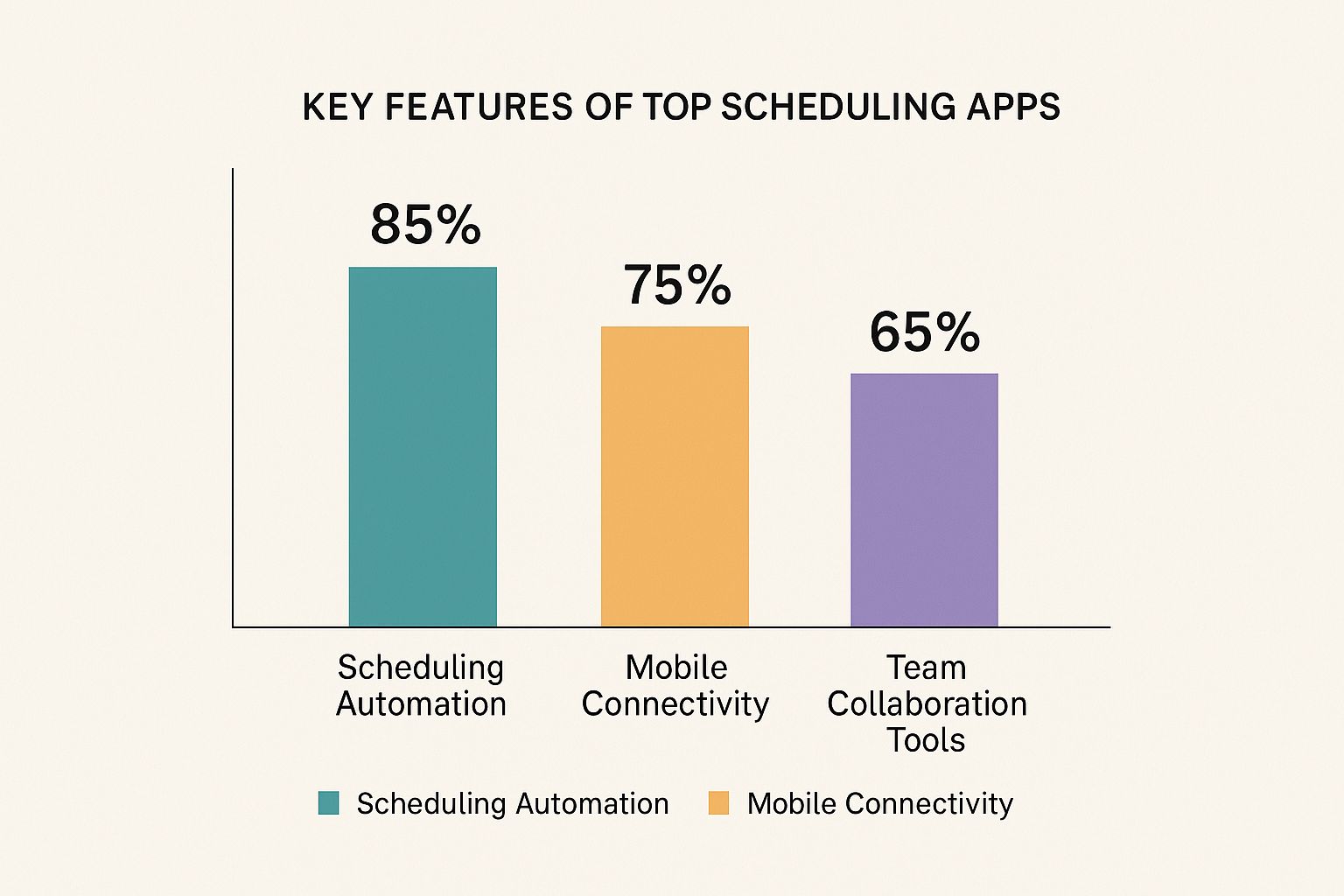
The data speaks for itself: scheduling automation (85%) is the most widely adopted feature. This tells us that contractors of all sizes are looking for ways to improve efficiency and cut down on manual data entry.
Final Evaluation and Situational Recommendations
At the end of the day, choosing the best scheduling app means having an honest look at your company’s scale and its biggest headaches. There’s no silver bullet here; what works wonders for one contractor could be a total bottleneck for another.
Here’s a simple breakdown to help guide your decision:
| App Name | Best For | Core Strength | Ideal Project Size |
|---|---|---|---|
| Jobber | Small to medium residential contractors, service-based businesses. | All-in-one simplicity for scheduling, quoting, invoicing, and client management. | 1-25 employees |
| Fieldwire | Field teams, foremen, and subcontractors on projects of any size. | Jobsite task management, blueprint collaboration, and punch list efficiency. | 5-100+ employees |
| Procore | Large general contractors, developers, and enterprise-level firms. | Comprehensive, end-to-end project management with deep financial controls. | 50-1000+ employees |
Your choice should ultimately come down to your primary business need.
- If your biggest challenge is juggling a high volume of smaller jobs and keeping clients happy, Jobber is almost certainly your best bet.
- If you need to give your teams in the field better access to plans and a dead-simple way to track daily progress, Fieldwire is an outstanding choice.
- If you’re running massive, complex projects with countless moving parts and need total command over every detail, Procore is the industry standard for good reason.
The right tool won’t just help you schedule better; it will give you the visibility and control you need to grow your business profitably in a tough market.
Understanding the True Cost of Your Scheduling Software

When choosing a scheduling app, it's easy to get fixated on the advertised monthly fee. But that number is often just the tip of the iceberg. I’ve seen countless contractors get caught out by the total cost of ownership (TCO), where a seemingly cheap tool quickly becomes a major financial headache because of hidden expenses.
To make a smart investment, you have to look past the sticker price. Most apps use one of a few common pricing models—per-user subscriptions, tiered plans, or even a percentage of project value. Each one has its own way of hiding costs that can inflate your budget if you aren't careful.
Deconstructing Common Pricing Models
The per-user, per-month model is probably the most common. It looks simple enough, but the costs can balloon as your team expands. Bringing on just five more people for a new project could easily double your monthly bill, turning a minor expense into a significant operational cost you hadn't planned for.
Then you have the tiered plans: Basic, Pro, Enterprise, and so on. The trap here is that the one feature you absolutely need—like proper job costing or subcontractor portals—is almost always locked away in the most expensive tier. You sign up for a cheap plan, only to realise you have to upgrade immediately to get the tools to actually run your business.
An app with a low entry price that nickel-and-dimes you for every integration or bit of data storage can end up being far more expensive than an all-inclusive platform. You need to map out your genuine needs and check exactly what’s included versus what’s considered a paid "add-on."
Exposing the Hidden Costs
Beyond the subscription, there are several other costs that pop up during setup and day-to-day use. You absolutely must factor these into your evaluation.
- Implementation and Onboarding Fees: Many of the more powerful platforms charge a one-time fee for setup, migrating your data, and getting your team trained. This can run from a few hundred to several thousand dirhams.
- Mandatory Training: Some vendors won't let your team use the software until they've completed paid training sessions. It’s another expense to add before you even get started.
- Integration Charges: That seamless connection to your accounting software? It might not be so seamless. Even if an app advertises "integrations," you often need a separate subscription to another service or have to pay the app provider an extra monthly fee to use it.
- Data Storage Overages: Think about all the project photos, blueprints, and daily reports you generate. Many plans cap your data storage, and going over that limit can lead to some surprisingly high charges. This problem only gets worse as your business grows and your project history deepens.
Thinking ahead about these software expenses is a core part of effective construction cost management.
Cost Scenarios for UAE Contractors
Let's look at a couple of real-world scenarios to see how these costs can stack up for a UAE-based construction firm.
Scenario 1: Small Renovation Firm (10 Users)
A small team picks an app that costs AED 150 per user, per month. That's AED 1,500 monthly. But soon, they need a crucial accounting integration for an extra AED 370 a month. They also blow past their data limit, adding another AED 185. Their real monthly cost is now AED 2,055—a 37% jump from what they initially budgeted for.
Scenario 2: Mid-Sized Contractor (50 Users)
A larger company goes for a tiered plan at AED 9,200 per month. The monthly cost is fixed, but they first have to pay a one-time implementation fee of AED 18,000 and shell out AED 11,000 for mandatory team training. That's a hefty upfront investment before they even log a single hour.
This kind of analysis makes it clear: you have to look at the full picture. The best scheduling app isn't the one with the lowest price tag; it's the one that delivers the most value without any nasty financial surprises down the road.
Putting Scheduling Apps to the Test: Real-World UAE Scenarios
It’s one thing to read a list of software features, but it’s another thing entirely to see how they perform on a real, chaotic UAE job site. Let's walk through three common project types here to see how the right scheduling app can solve very specific, on-the-ground challenges.
This is where theory meets reality.
Managing a Luxury Villa Build on Palm Jumeirah
Picture this: you're building a high-end villa where the client has sky-high expectations and the deadlines are razor-thin. You’re juggling specialist subcontractors for everything from Italian marble to smart home automation. One small delay from a single team could trigger an expensive and frustrating domino effect across the entire project.
For a job like this, you need an app that excels at:
- Granular Task Dependencies: It must be able to link tasks intelligently. If the MEP rough-in is delayed, the drywall installation schedule must automatically shift to reflect that. No manual adjustments needed.
- Client Communication Portal: A clean, simple portal where the client can see daily progress photos, sign off on change orders with a tap, and view a simplified timeline. This keeps them informed and happy.
- Subcontractor Management: The ability to give subcontractors access only to their specific schedules and drawings. This cuts down on the noise and prevents costly mix-ups.
In this case, a comprehensive, all-in-one platform with a strong client-facing component is your best bet. It’s all about maintaining transparency and momentum when complexity is high.
Coordinating a Rapid Commercial Fit-Out in a Busy Mall
Now, let's switch gears to a fast-track retail fit-out in a place like Dubai Mall. Here, the pressure is immense. You're operating under strict mall hours, dealing with noise restrictions, and managing just-in-time deliveries to a site with virtually no storage space. The whole project has to be done and dusted in weeks for the grand opening.
The real challenge here isn't just scheduling tasks; it's managing the intense logistics and constraints of the environment. The app becomes your central command centre, making sure every minute on site counts.
Success on this kind of job hinges on operational agility. You need real-time dispatching to reroute a crew if a delivery gets stuck in traffic. You also need mobile-first daily logs with photo capabilities to prove you’re complying with mall rules. For these high-pressure projects, powerful resource management isn't a nice-to-have, it's a necessity. If you want to dive deeper, understanding the fundamentals of good construction logistics is crucial for these types of jobs.
Handling a Large-Scale Infrastructure Project
Finally, imagine a massive infrastructure job, like the initial earthworks for a new master development. You're managing hundreds of workers and a fleet of heavy machinery across a huge, sprawling site. Scheduling here is less about minute-by-minute tasks and more about macro-level resource allocation and progress tracking.
The numbers really tell the story here. The Middle East and Africa's infrastructure construction market is on track to hit USD 266.71 billion by 2030, a boom driven by mega-projects that simply can't afford inefficiency. Contractors on these massive jobs report that scheduling accuracy jumps by 20-30% after implementing apps with solid compliance and resource management tools. You can read more about the infrastructure market growth on Mordor Intelligence.
For a project of this scale, an enterprise-level platform is the only way to go. It must have advanced Gantt charts, robust job costing to track spending against the budget in real-time, and equipment tracking to make sure every piece of machinery is working, not sitting idle.
A Practical Guide to Implementing Your New Scheduling App

Choosing the right scheduling app is a great start, but getting it running smoothly is where you’ll see the real value. A successful rollout hinges on a smart, practical plan. The aim is simple: switch from your old methods to the new system without stalling progress on any of your active projects.
The first job is to create a solid plan for data migration. You aren't starting from a blank slate; you need all your current project details, client contacts, and subcontractor information in the new system. Most reputable apps provide tools or support to import this data from spreadsheets, which is essential for keeping your operations running without a hitch.
Setting Up for Success
With your data loaded, the next step is to configure user permissions and roles. The access your project managers in the office need is completely different from what your site foremen or field crews require. A properly organised permission structure means everyone sees only what’s relevant to their job, which simplifies things and protects sensitive project data from accidental edits.
After that, it's a good idea to build out your project templates. For recurring job types, like a commercial fit-out or a villa renovation, you can create templates with pre-loaded tasks, standard checklists, and typical timelines. This is a huge time-saver and brings a welcome level of consistency to every project you take on.
Trying to launch the app across the entire company at once is a recipe for headaches. I've always found a phased rollout works best. Start with one of your more tech-savvy teams on a new project. Let them find and fix any issues. Their success story will be the best way to get everyone else on board.
Driving Adoption and Integration
Let's be honest: getting people to embrace new tech can be tough. That's why proper training is so important. Don’t just send out a link to a tutorial video. Run hands-on sessions where your crews practice real-world tasks they'll do every day, like submitting a daily report or updating a task right from their phone on-site.
The construction sector here in the UAE is moving fast toward digital tools to handle the sheer complexity of modern projects. This shift, especially towards cloud-based apps, is a direct answer to common headaches like project delays and supply chain hiccups. With the UAE government pushing for digital construction, these apps are also becoming key for tracking environmental compliance and aligning projects with national economic strategies. You can find more analysis on the Middle East construction market on nextmsc.com.
Finally, make sure the app talks to your other essential software, like your accounting or ERP systems. This integration creates one seamless workflow, letting data move automatically from the field to your finance department. It’s how you automate invoicing, simplify payroll, and get a clear, live picture of each project’s profitability without tedious double-entry.
Common Questions We Hear on the Job
Picking the right software is a big decision, and naturally, you'll have questions. Let's tackle some of the most common ones we hear from contractors in the field to clear up any lingering doubts.
"What Happens if We Lose Internet at the Site? Do These Apps Still Work?"
Absolutely. The best apps are built for the realities of construction sites, where connectivity can be patchy. Most leading platforms offer a solid offline mode.
This means your crew can still pull up their schedules, mark tasks as complete, and even fill out their daily reports without a signal. As soon as their phone or tablet reconnects to the internet, everything they've done automatically syncs back up. It’s a crucial feature, especially for new developments or remote projects across the UAE.
"How Safe is Our Company and Client Information?"
This is a non-negotiable, and any software provider worth their salt takes it seriously. Reputable apps use multiple layers of security to protect your sensitive project data.
You should expect to see security measures like:
- Data Encryption: This scrambles your data while it's being sent over the internet and while it's stored on their servers.
- Secure Cloud Hosting: They typically rely on major, secure platforms like Amazon Web Services (AWS) or Microsoft Azure.
- Access Controls: You can set permissions so that a subcontractor, for example, only sees the jobs relevant to them and not your entire company's schedule.
A good rule of thumb: if a provider isn't upfront about their security measures, that's a major red flag. Always check their policy before you sign up.
"Is It a Nightmare to Get the Whole Crew Using a New App?"
It's a valid concern. The last thing you want is a tool that your team refuses to use. Thankfully, modern scheduling apps are designed with the field user in mind—think simple, clear interfaces that are easy to navigate, even for those who aren't tech experts.
The key to a smooth rollout is your approach. Instead of pushing it on everyone at once, start with a small group of your most tech-friendly crew members. Once they see how much easier it makes their day, they'll become your biggest advocates and can help train everyone else. Plus, most companies offer tutorials and support to get your team comfortable.
For a complete range of construction supplies that keep your projects on schedule, Yasu Trading Co. LLC provides everything from durable power tools to certified safety equipment. Explore our product catalogue to streamline your procurement today.